Microsoft Dragon Copilot --
Your AI Clinical Assistant.
More Time for Patients. Less Time on Paperwork.
|
Microsoft Dragon Copilot combines the power of voice dictation, ambient (always-listening) speech technology, and advanced generative AI into one intelligent clinical workspace—helping physicians, nurses, and care teams work more efficiently, document more accurately, and focus on what matters most: their patients.
|

Picture: Dragon Copilot - Image of three providers at work while Dragon Copilot works in the background
 |
IMAGE Management, LLC is an authorized Microsoft Partner selling and supporting Microsoft Dragon Copilot. |
Overview
What Is Microsoft Dragon Copilot?
Microsoft Dragon Copilot is an AI clinical assistant built to simplify the way care teams work—from the first moment of a patient encounter to the final signed note. It listens to clinical conversations, automatically generates specialty-specific documentation, surfaces relevant patient information on demand, and handles routine tasks so clinicians can focus on the patient in front of them rather than the screen beside them.
Dragon Copilot brings together three proven technologies in a single, unified platform: the natural language voice dictation capabilities of Dragon Medical One, the ambient (background) listening and note-generation capabilities of DAX Copilot, and the latest advances in generative AI (the same large-language model technology behind tools like ChatGPT, fine-tuned for clinical accuracy and safety). The result is a clinical assistant that does far more than transcribe—it understands, organizes, and acts on clinical conversations in real time.
Part of Microsoft Cloud for Healthcare, Dragon Copilot scales across practices of all sizes and specialties, and is accessible in three modalities:
- MOBILE - Use the Microsoft Dragon Copilot mobile app -- on either your iPhone/iPad or Android smartphone,
- BROWSER - Access the site in your Chrome or Edge web browser, or
- DESKTOP - Use the Microsoft Dragon Copilot desktop application on your Windows PC.
There are two Microsoft Dragon Medical products:
- “Microsoft Dragon Copilot” is Microsoft's flag-ship Dragon Medical product and provides a comprehensive AI clinical assistant and front-end dictation. This current page discusses Microsoft Dragon Copilot! Keep reading to learn more!
|
Microsoft Dragon Copilot is the next evolution of the product previously known as Nuance DAX Copilot. All DAX Copilot capabilities are included in Dragon Copilot, along with significant new features. Dragon Copilot represents Microsoft's unified brand for clinical AI—the first Dragon product to stand fully under the Microsoft name. If you have questions about transitioning from DAX Copilot, contact us.
|
- “Dragon Medical One” is the original front-end dictation product allowing direct dictation into electronic medical records and other apps. Click here to go to our Dragon® Medical One page.
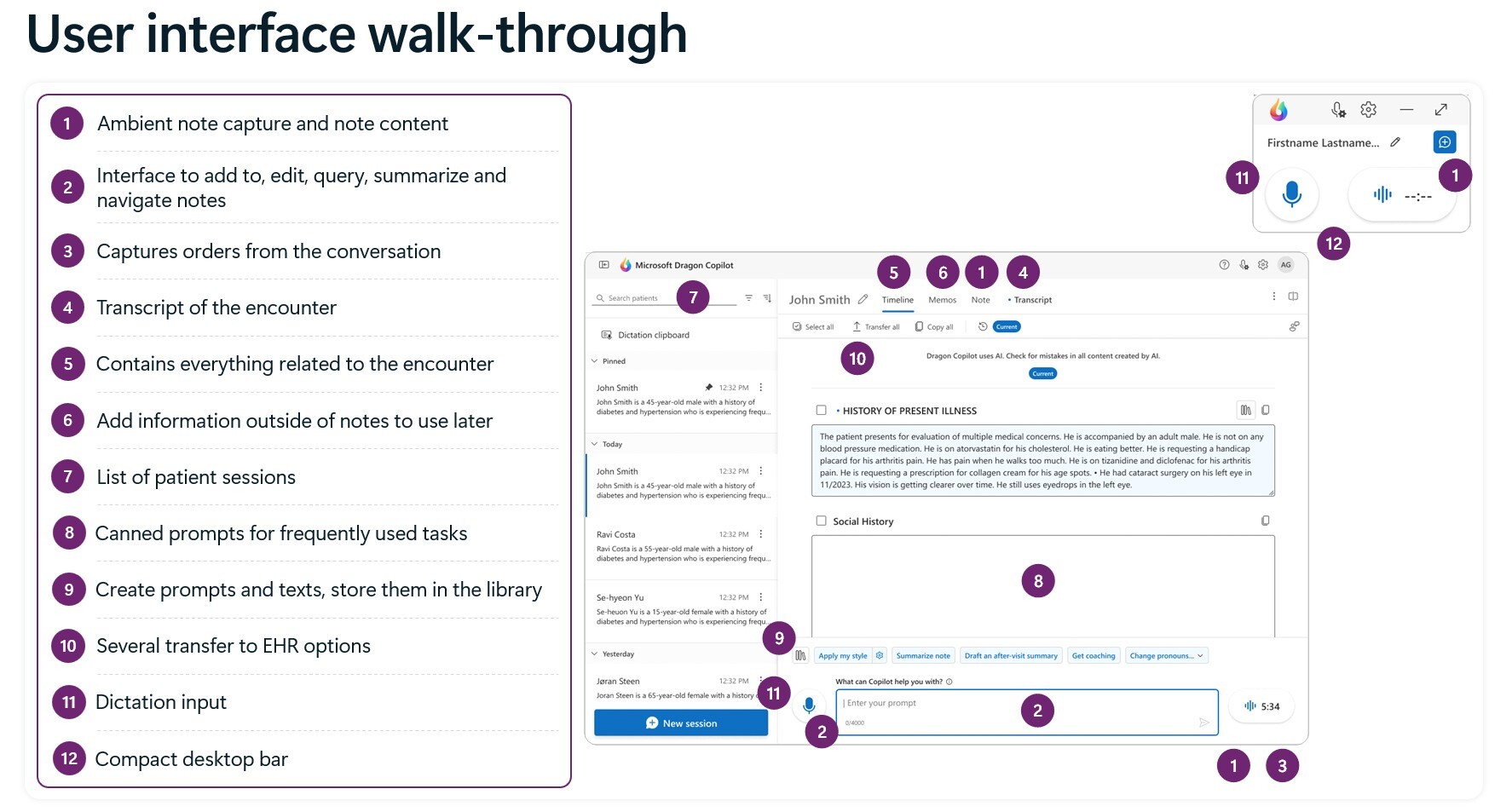
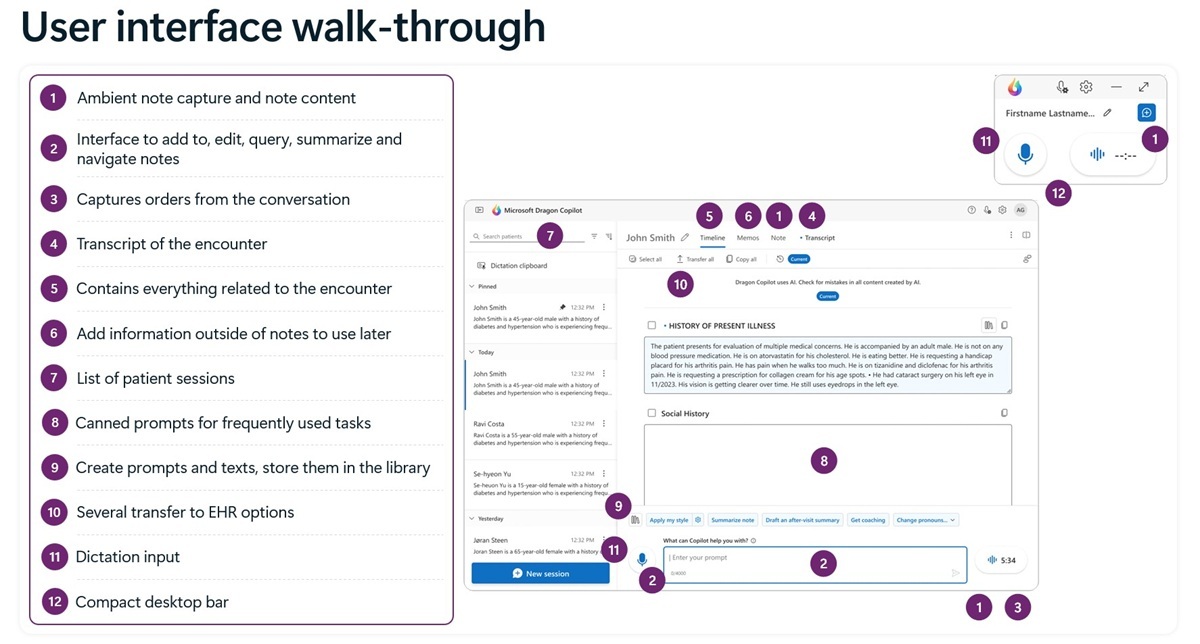
Dragon Copilot User Interface (UI) walk-through
Click this image to enlarge!
Microsoft understands healthcare!
| 20+ |
1B+ |
20M+ |
600K+ |
| Years Microsoft has delivered award-winning medical speech recognition |
Minutes of medical dictation processed annually -- the foundation of Dragon's clinical AI |
Ambient clinical encounters recorded and processed to refine accuracy |
Clinicians across thousands of organizations already using Dragon |
Core Capabilities
Three Ways Dragon Copilot Changes How You Work
Dragon Copilot is organized around three core actions that together transform the clinical day—from the waiting room to the after-hours chart review.
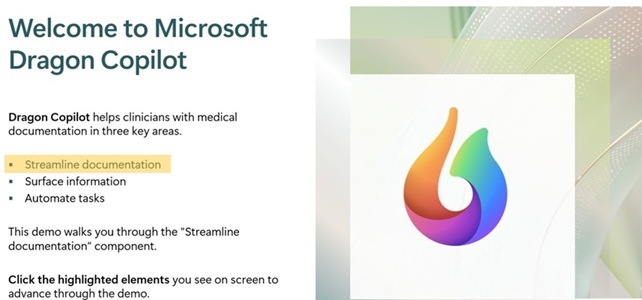
Streamline Documentation
Dragon Copilot listens to your clinical conversations—whether in-person or via telehealth—and automatically converts them into structured, specialty-specific draft notes. It supports multi-party conversations (up to 10 speakers), multi-language encounters (58 languages), and multiple sessions up to 120 minutes. You review, edit, and sign; Dragon does the documenting.
- Ambient (background) note creation during the visit
- On-demand voice dictation any time—before, during, or after the encounter
- Custom templates, specialty-specific note formats, AI-generated prompts
- Natural language editing ("update the medication section to reflect 100mg of Cozaar daily")
- Automatic generation of referral letters, after-visit summaries, and discharge instructions
|
|

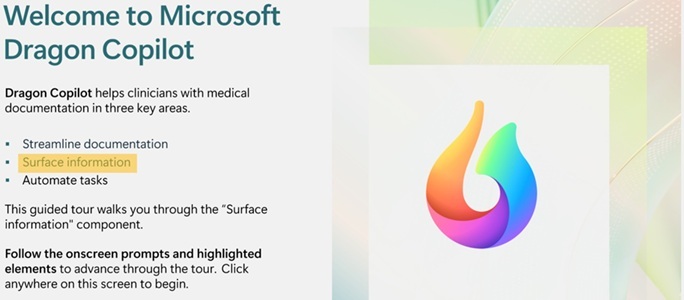
Surface Information
Dragon Copilot brings the right information to you—without requiring you to search, click away, or interrupt your visit. Ask a question in plain language and Dragon Copilot retrieves answers from the encounter transcript, the patient's notes, or trusted medical reference sources, with citations.
- "What medications did the patient say they're taking?"
- "Does this patient have a relevant family history of diabetes?"
- "What is the clinical difference between systolic and diastolic heart failure?" (explained at point of need—useful when explaining to patients as well)
- In-app access to evidence-based medical references with cited responses
- Real-time data surfacing without toggling between screens or systems
|
|

Automate Tasks
Beyond documentation, Dragon Copilot handles the downstream work that typically extends the clinical day. With a single click or voice command, it prepares outputs that would otherwise require significant manual effort.
- Coding suggestions extracted from the clinical narrative (valuable for coding specialists and practice managers)
- Order capture—orders mentioned during a visit are recognized and prepared for entry
- Referral letters drafted from the encounter summary
- After-visit summaries in plain language for patients
- Clinical evidence summaries and encounter highlights
- Note customization: adjust tone, pronouns, formatting with natural language commands
|
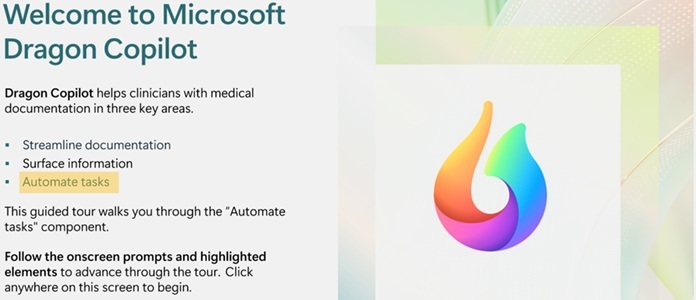
 Tour Dragon Copilot to see a demo of the product in action
3. Welcome to Dragon Copilot Self-Guided Demo - Automate Tasks:
Who Benefits
Built for Every Role on Your Care Team
Dragon Copilot is not a one-size-fits-all solution. Microsoft has built role-specific workflows so that each member of the clinical team gets the features and interface most relevant to how they work.
Physicians & Mid-Level Providers
(NPs, PAs, Hospitalists, Specialists)
Dragon Copilot works across every stage of the physician's day—from pre-charting before the first appointment to late-evening note completion. It listens during the encounter and generates a structured draft note automatically. The physician reviews, edits using voice or keyboard, and signs. No more after-hours catch-up charting.
- Available via mobile app, web browser, desktop app
- Works in-office, telehealth, and inpatient settings
- Supports all ambulatory specialties plus emergency medicine
- Generate coding suggestions, referral letters, and after-visit summaries automatically
- Ask clinical questions in natural language and get cited answers instantly
|
|
Dragon Copilot captures real-time clinical observations during patient interactions and converts them into structured information. Flowsheet documentation can also be created.
- Ambient capture of patient observations during care
- Assists in gathering pre-visit patient information
Or, flowsheet data if needed.
- Frees nursing staff to spend more time with the patient.
|
|
Dragon Copilot creates financial and operational value that extends well beyond the clinical encounter. More complete, accurate documentation translates directly to better coding, fewer claim denials, and faster reimbursement cycles. Practice managers and billing teams benefit from documentation that is both timely and thorough.
- AI-suggested coding (ICD-10, CPT) derived from the clinical narrative—for coding specialist review
- More complete documentation reduces downstream audit risk
- Centralized administrative console for user management, roles, licenses, and compliance reporting
- Scales across single-provider practices to large health systems
- HIPAA-compliant, enterprise-grade security under Microsoft's cloud infrastructure
|
Built for Your Specialty, Not Just Any Clinical Setting
Dragon Copilot is not a generic voice-to-text tool adapted for healthcare. It is trained on over one billion minutes of medical dictation annually, with specialty-optimized AI models, built-in clinical templates, and note structures tailored to how each specialty actually documents.
|
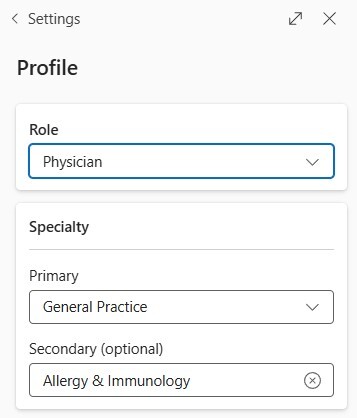
Dragon Copilot creates a user profile for each user.
Users select their role, primary specialty and secondary specialty -- information Dragon Copilot uses to formulate the best results.
|
|
The following specialties have additional dedicated workflow optimizations:
Cardiology
Emergency Medicine
Gastroenterology (GI)
Orthopedics
Pediatrics
Primary Care
Urgent Care
Inpatient / Hospital Medicine
Mental Health
Radiology
Nursing / Inpatient
All Ambulatory Specialties
Don't see your specialty listed? Dragon Copilot supports all ambulatory specialties and is continuously expanding.
Specialty-Specific Resources Available: We have detailed one-pagers showing Dragon Copilot's workflow in Cardiology, Emergency Medicine, GI, Orthopedics, and Pediatrics.
Contact us to request additional information and/or the guide for your specialty.
|
Real-World Workflow
What Dragon Copilot Looks Like in a Clinical Day
|
Consider some excerpts from a typical day for Dr. Hudson, an interventional cardiologist.
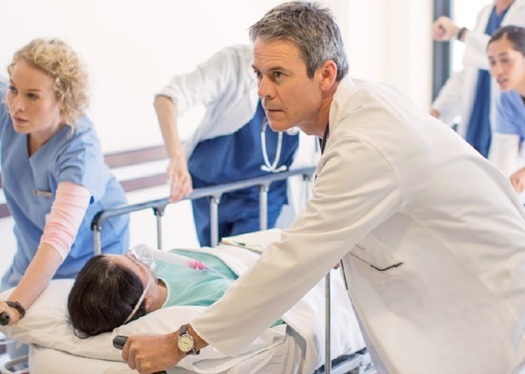
Dragon Copilot works alongside her from the moment she logs in at the clinic through a hospital consult, a care-team case review, and an after-hours emergency.
At every step, Dragon Copilot reduces the cognitive and administrative load so she can focus on patients.
|
 |
|
7:00am
Clinic
|
Pre-Charting Before the First Patient
Dr. Hudson uses Dragon Copilot's natural language capabilities to pre-chart a post-operative angioplasty follow-up before her first appointment. She also reviews referral and appointment data to flag care gaps and missed follow-ups—without leaving her workflow. |
|
|
9:05 AM
Clinic |
Ambient Documentation During the Patient Visit
Dragon Copilot listens to the patient encounter and generates a structured cardiology note automatically. Dr. Hudson talks naturally with her patient—no dictation commands, no scribing. After the visit, she reviews the draft, makes a voice-command edit ("add my Cardiology Assessment and Plan"), and signs. Total documentation time: under two minutes.
|
|
|
10:00 AM
Hospital |
Hospital Consult — Surfacing Patient Information
En route to a consult on a post-cardiac-surgery patient, Dr. Hudson uses voice commands on her mobile device to surface and review the patient's chart. During the visit, Dragon Copilot captures the conversation and helps create patient education materials for the discharge discussion.
|
|
|
12:00 PM
Conference |
Case Review with the Care Team
Dragon Copilot generates a concise case summary for a patient who recently had a stent placed. Dr. Hudson shares it with the team ahead of the meeting. The summary is accurate, well-organized, and ready—no manual write-up required.
|
|
|
4:30 PM
At Home |
After-Hours Documentation—Without Burnout
If any remaining documentation needs attention, Dragon Copilot's on-demand recording and AI assistance means Dr. Hudson can complete her notes quickly from any device, without the hours-long catch-up sessions that drive clinician burnout.
|
Customer Stories
What Clinicians and Health Systems Are Saying
Thousands of clinicians across the country have already made Microsoft Dragon Copilot part of their daily workflow. Here is what some of them report.

"Clinicians are able to talk naturally with patients, and the system is able to draft a structured note instantly. That saves a lot of time, saves a lot of mental energy."
Snehal Gandhi, MD
Vice President & Chief Medical Information Officer
Cooper University Health Care
|
|

"Dragon Copilot has allowed me to really just get the most difficult parts of my note done quickly. I'm amazed at how it is able to capture the most relevant data for the visit."
Janet Engle, MD
Pediatrician
Vail Health
|
|
|
|

"Our nurses have experienced significant improvements in their time at the bedside with the patient. One nurse shared that Dragon Copilot has saved her approximately 2 hours of charting in a 12-hour shift."
Stephanie Whitaker, MSN, RN
Chief Nursing Officer
Mercy
~2 hours saved
per 12-hour nursing shift
|
|

"As we integrate artificial intelligence and advanced data, this tool will simplify the care we deliver and improve the quality of care and experience for our patients and our communities."
JP Valin, MD, MHA, MACP
Chief Clinical Officer
Intermountain Health
27% reduction in time spent per note per appointment
Over 2,500 active clinician users
|
|
|
|
Why Dragon Copilot
Five Things That Set Microsoft Dragon Copilot Apart
When evaluating an AI clinical documentation solution, the question is not just what the technology does, but who stands behind it, how it is built, and what happens when you need support. Here is why Dragon Copilot leads the market.

Experience & Expertise
Over 20 years of Microsoft delivering award-winning clinical speech recognition—the longest track record in the industry. Dragon Copilot is built on a rich clinical data set and the experience that no competitor can replicate.
|
|

Scale
Works with and in leading EMRs. Available via mobile, web, and desktop. Scales from one user to any number of users. Works in all ambulatory specialties, emergency medicine, and inpatient settings. Dedicated teams drive adoption organization-wide.
|
|

Technological Leadership
Optimized for clinical environments with proprietary natural language and ambient speech capabilities, fine-tuned generative AI, and an extensible platform built on Microsoft Azure—the most trusted cloud infrastructure for AI at scale.
|
|

Support
A customer support organization with your partner as your local contact and thousands of Microsoft team members at-the-ready. Coordinated support with Microsoft and EHR partners. Comprehensive in-app training resources and expert-staffed virtual rooms.
|
|

Built on Trust
Microsoft Secure Future Initiative. HIPAA-compliant. Healthcare-specific clinical safeguards for AI accuracy and safety. Responsible AI principles—fairness, transparency, privacy, and accountability—embedded throughout the product.
|
Microsoft Dragon Copilot, Sold and Supported by IMAGE Management, LLC
|
IMAGE Management, LLC has been helping healthcare providers, practices, and organizations select, deploy, and support speech recognition and clinical documentation technology since 1992. We are an authorized Microsoft Partner with hands-on experience in Dragon and clinical workflow solutions.
When you purchase Microsoft Dragon Copilot through IMAGE Management, you get more than a product license. You get a knowledgeable partner who understands your clinical environment, can advise on deployment strategy, and is reachable when you have questions.
We work with physicians in private practice, multi-specialty groups, hospital-affiliated clinics, hospitals, and federal healthcare facilities. Whether you have one provider or a team, we can help you evaluate, deploy, and get the most out of Microsoft Dragon Copilot.
Questions? Ready to see a demo? Want to talk through how Dragon Copilot can fit your practice? Contact us — we're a real person, not a form.
|
|

|
Frequently Asked Questions
Common Questions About Microsoft Dragon Copilot
-
What is Microsoft Dragon Copilot, and how is it different from DAX Copilot or Dragon Medical One?
-
Microsoft Dragon Copilot is a unified AI clinical assistant that combines three previously separate capabilities: the natural language voice dictation of Dragon Medical One, the ambient (background) encounter documentation of DAX Copilot, and advanced generative AI.
Dragon Medical One is a powerful cloud-based medical dictation product—you speak, it types. It is still available as a standalone product and remains a foundational component of Dragon Copilot.
DAX Copilot introduced ambient (background) listening—the AI listens to your patient encounter and writes the note automatically, without you dictating. DAX Copilot capabilities are now part of Dragon Copilot.
Dragon Copilot does all of the above, plus adds generative AI capabilities such as question-answering, task automation, coding suggestions, and deep EHR integration—all in one platform. It is the current flagship product.
-
How does the ambient (background) listening work? Is it always recording?
- Dragon Copilot's ambient mode is clinician-controlled. You activate it when you are ready to begin an encounter and deactivate it when the visit ends. It is not always recording. Audio is transmitted via your internet connection using secure, HIPAA-compliant methods to Microsoft's cloud infrastructure, where speech recognition and AI processing occur. No audio is stored beyond what is needed to generate and review the clinical note.
-
How do clinicians access Dragon Copilot?
Microsoft Dragon Copilot is ready when you are using any of its three modalities.
IMPORTANT: You must have a license and valid login/password to use the product.
- MOBILE - Using the Microsoft Dragon Copilot mobile app - available for Apple iPhone/iPad iOS or Android OS.
- BROWSER - Using Microsoft Dragon Copilot from within your Chrome or Edge web browser.
- DESKTOP - Using the Microsoft Dragon Copilot desktop application.
-
What specialties and practice settings does Dragon Copilot support?
- Dragon Copilot supports all ambulatory specialties, emergency medicine, inpatient care, and mental health (case management, social work, psychology, psychiatry, etc.) .
- Specialty-optimized AI models are available for Cardiology, Emergency Medicine, Gastroenterology, Orthopedics, Pediatrics, and others.
- Dragon Copilot works in both in-office and telehealth settings.
-
Is Dragon Copilot available for small practices with just one or a few physicians in addition to large organizations?
- Yes. Dragon Copilot is licensed per user (per clinician) and works for any size organization -- from single-provider practices to large enterprises.
- Pricing is subscription-based. Contact IMAGE Management for pricing and to discuss how Dragon Copilot can work in your organization and with your workflow.
- What if you have access to Dragon Copilot (or Dragon Medical One) at your affiliated hospital?
- Even if you use Dragon Copilot (or Dragon Medical One) at one of your affiliated hospitals, you may want to purchase your own unrestricted license as you will not have rights to use the product purchased by the hospital outside the hospital and its medical record.
Resources
Learn More About Dragon Copilot
Datasheet — Physicians Take Clinical Productivity to New Heights - Learn how Dragon Copilot streamlines documentation, surfaces information, and automates tasks across care settings.
Download Dragon Copilot data sheet →
Ready to See What Dragon Copilot Can Do for Your Practice?
Talk to IMAGE Management, LLC — your local, experienced Microsoft Partner. We can walk you through a demo, answer your questions, and help you figure out if Dragon Copilot is the right fit.
Whether you want to see a demo, get pricing, or just ask questions—reach out to IMAGE Management directly.