

Product?
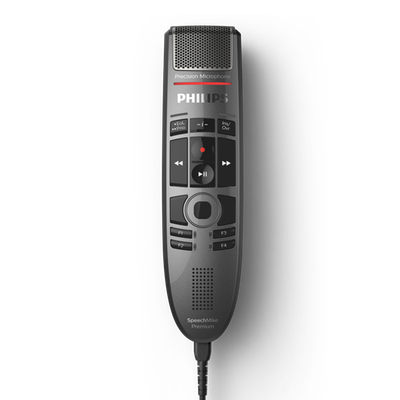
Philips SpeechMike SMP3700 Premium Touch Dictation Microphone
Scroll for more info or click to jump to:
- PowerMic to SpeechMike: What You Need to Know
- Product Summary/License Info
- Product Features
- System Requirements/Technical Specifications
- Using the SpeechMike with PowerScribe
- Resources
PowerMic to SpeechMike transition
Microsoft discontinued the PowerMic (effective May 7, 2025) and designated the Philips SpeechMike Premium Touch as the recommended upgrade for both the PowerMic III and PowerMic 4.
The SMP3700 is designed to be a seamless transition: it shares the same physical button layout as the PowerMic 4, works with the same dictation software, and is fully compatible with Dragon Copilot, Dragon Medical One, Dragon Professional, Dragon Legal, and most PowerScribe configurations.
Are you looking for a direct PowerMic III or PowerMic 4 replacement? The SMP3700 is available now. Contact Us if you have migration questions.
Product Summary/License Info:
How delivered? Ships as a physical device. Includes attached USB cable and Quick Start Guide. Ready to use out of the box.
Who can purchase? No restrictions.
Applications? Speech Recognition, Dictation -- Clinical dictation (physicians, nurse practitioners, physician assistants, practice managers, EMR/EHR specialists, coding specialists); radiology dictation via PowerScribe; legal and professional dictation; general voice documentation.
Connectivity/Form Factor? USB -- USB 2.0 Type A wired connection. Handheld dictation microphone with 8.2-foot (2.5m) attached cable. Plug-and-play — no additional driver required for basic use.
What's in the box? SpeechMike SMP3700 Premium Touch Dictation Microphone with attached USB cable (2.5 m / 8.2 ft) and quick start guide.
Warranty? Manufacturer's warranty applies. SPS provides one (1) year warranty for original end-user purchaser.
Return Policy? This product is a technology hardware product. See our Return Policy.
Questions? Have questions or want a custom quote (with software, accessories, services, etc.)? Contact Us. Also visit our Dictation Support page for more product info.
Product Features:
The Philips SpeechMike Premium Touch SMP3700 is a professional-grade dictation microphone built for demanding clinical, radiology, legal, and enterprise documentation environments. Manufactured by Speech Processing Solutions GmbH (SPS) — the company that holds the long-term license to the Philips brand for speech and dictation products — it carries forward more than 30 years of professional dictation hardware engineering.
- Microphone & Recording Quality
- Uses a decoupled electret condenser microphone capsule — the microphone element is mechanically separated from the housing, which isolates it from handling vibration and touch noise.
The result is notably cleaner dictation audio compared to previous-generation dictation mics, even in environments where the user moves or repositions the device during recording. - The 10mm uni-directional capsule has a frequency response of 200–12,000 Hz (the range relevant for speech), a sensitivity of -37 dBV, and a signal-to-noise ratio exceeding 70 dBA.
- The microphone grille is designed to improve pickup area and reduce proximity effects for users who hold the device at varying distances.
- Playback
- The SMP3700 includes an integrated 30mm dynamic speaker with a frequency response of 300–7,500 Hz and more than 200 mW of output power.
- The speaker is positioned to allow hands-free playback review without earbuds — useful in clinic workflows where a provider dictates, steps away, and returns to confirm or correct before signing off a note.
- Ergonomic Push-Button Controls
The SMP3700 uses push-button operation (as distinguished from the slide-switch SMP3710 variant).
It features five configurable function buttons positioned to match the physical layout of the PowerMic 4, which eases transition for existing PowerMic users. - Record button — supports either press-and-hold or on/off toggle mode (configurable)
- Play/Pause, Rewind, Fast Forward — for dictation review and navigation
- End of Letter (EOL) / Insert-Overwrite (INS/OVR) — standard dictation workflow controls
- F1–F4 programmable buttons — assignable to dictation software commands
- Command button — triggers voice commands in compatible speech recognition software
All main buttons are configurable in Dragon Medical One, PowerScribe, and other supported platforms.
When migrating from a PowerMic 4, note that the F3 button and "-i-" button on the PowerMic do not have equivalents on the SpeechMike. These two functions are not supported on the SMP3700 and should be remapped in your dictation software administration console.
- Intelligent Motion Sensor
- The SpeechMike Premium Touch is equipped with an integrated motion sensor.
When the microphone is set down on a desk, it automatically enters standby mode, reducing background noise pickup and conserving system resources.
When picked up, it reactivates instantly. - Touch Sensor / Mouse Function
- The top of the SMP3700 includes a touch-sensitive surface that functions as a mouse, allowing the user to navigate the cursor and click without releasing the device or reaching for a separate input device.
- This is especially useful for clinicians navigating within an electronic health record (EHR) or electronic medical record (EMR) system while dictating — the device itself becomes the pointing device.
- Hygienic and Durable Design
- Clinical environments require equipment that can be disinfected between users.
The SpeechMike Premium Touch SMP3700 features a smooth, antimicrobial surface across the full housing. - Hygienic pearl metallic surface inhibits germ colonization and simplifies routine disinfection
- Polished surface resists fingerprints and touch noise
- The surface resists common disinfectant agents and is designed to be wiped down according to standard infection control protocols. The microphone windscreen accessory is dishwasher-safe.
- Speech Recognition Compatibility
- Native, built-in support for Nuance Dragon (Professional 12.5–15, Legal 12.5–15, Medical Practice Edition 2/3, SDK Client Edition 14), M*Modal Fluency Direct 8.0+, and Fusion Narrate powered by nVoq
- Also compatible with leading hospital information systems (HIS), radiology information systems (RIS), and PACS systems
- Plug-and-play installation — no additional drivers required for supported systems
- Exchangeable Cable
- Unlike devices with permanently attached cords, the SMP3700 features a replaceable USB cable.
Cable wear is among the most common hardware failure points for dictation microphones used heavily in shared workstation environments.
Being able to replace the cable rather than the entire device extends the useful life of the hardware and reduces per-incident repair cost. - Hardware Configuration Software
- Philips SpeechControl is the free configuration tool for the SpeechMike Premium Touch.
It allows users and IT administrators to program button assignments, adjust motion sensor sensitivity, configure playback settings, and apply firmware updates.
SpeechControl is available for both Windows and Mac. - Note: If you are using the SMP3700 with PowerScribe, configure button functions through PowerScribe Preferences, not through Philips SpeechControl.
Configuring PowerScribe buttons via SpeechControl will not work as expected. See the PowerScribe section below for full details. - Firmware and Backwards Compatibility
- The SMP3700 firmware is upgradeable and is designed to remain compatible with the full range of legacy Nuance and Dragon software platforms.
- SPS has committed to a backwards-compatible firmware update path — meaning that as new versions of Dragon Copilot, Dragon Medical One, and other platforms are released, firmware updates for the SMP3700 are provided to maintain compatibility rather than requiring a new hardware purchase.
- Dictation Software Compatibility
- The Philips SpeechMike Premium Touch SMP3700 is compatible with the major dictation and speech recognition platforms in use today across clinical, legal, radiology, and professional environments.
- Enjoy this microphone with the Dragon products -- Dragon Copilot, Dragon Medical One, Dragon Legal, Dragon Professional, etc.
- IMAGE Management sells and supports the Dragon products directly.
- Firmware is backwards compatible with previous SpeechMike models — no software changes needed when upgrading
- System Requirements
- Operating System - Windows - Works with Windows 11 (64-bit), Windows 10 (64-bit), and macOS 12/11 (Mac functionality may be limited)
- Operating System - Mac - Works with macOS 15 (Sequoia) or macOS 14 (Sonoma) — limited support; verify compatibility with your specific dictation platform before ordering
- USB Port - USB 2.0 Type A or higher (USB 3.x ports are backwards compatible)
- Configuration Software - Configurable via Philips SpeechControl hardware management software (Windows and Mac)
- Are you looking for the Microsoft Nuance PowerMic 4 or its predecessors, the PowerMic III (PowerMic 3) or PowerMic II (PowerMic 2)?
- See above for more information about transitioning from a PowerMic.
- See this transition announcement webpage from SPS/Philips: https://www.dictation.philips.com/us/goodbye-powermic-hello-speechmike/
System Requirements/Technical Specifications
Connectivity
- USB 2.0, Type A (compatible with USB 3.x)
Audio Recording
- Microphone type: Electret condenser
- Capsule diameter: 10 mm
- Characteristic: Uni-directional
- Frequency response: 200–12,000 Hz
- Sensitivity: -37 dBV
- Signal-to-noise ratio: >70 dBA
Playback / Speaker
- Speaker type: Built-in round dynamic speaker
- Speaker size diameter: 30 mm
- Speaker acoustic frequency response: 300–7,500 Hz
- Output power: >200 mW
Physical
- Dimensions (W × D × H): 44 × 175 × 32 mm / 1.8 × 6.9 × 1.25 in
- Weight: 200 g / 7 oz (including cable)
- Cable length: 2.5 m / 8.2 ft
- Color: Dark grey pearl metallic
- Housing: High-class polymers
System Requirements (for Philips SpeechControl configuration software)
- Processor: Intel dual-core or equivalent AMD, 1 GHz or faster
- RAM: 2 GB (32-bit) / 4 GB (64-bit)
- Hard disk: 30 MB (SpeechControl); 4.5 GB (.NET Framework)
- OS: Windows 11, Windows 10 (64-bit); macOS 12/11 (limited)
- Graphics: DirectX-compliant with hardware acceleration recommended
- Sound: Windows-compatible sound device
- One available USB port
Supported Speech Recognition Software
- Microsoft (formerly Nuance) Dragon Copilot
- Microsoft (formerly Nuance) DAX Copilot
- Microsoft (formerly Nuance) Dragon Medical One
- Microsoft (formerly Nuance) Dragon Professional
- Microsoft (formerly Nuance) Dragon Legal
- Microsoft (formerly Nuance) Dragon Law Enforcement
- Microsoft (formerly Nuance) Dragon Medical Practice Edition
- Microsoft (formerly Nuance) Dragon and Dragon Copilot SDK Client Edition
- Solventum (formerly M*Modal) Fluency Direct
- Fusion Narrate powered by nVoq
Environmental Compliance
- RoHS compliant (2011/65/EU)
- Lead-free soldered
Operating Conditions
- Temperature: 5°–45°C / 41°–113°F
- Humidity: 10%–90%
Model Variants
- This page shows the SpeechMike Premium Touch model SMP3700.
- Other available models are:
SMP3710 with slide switch
SMP3800 with push button and integrated 1D/2D barcode scanner
SMP3810 with slide switch and integrated 1D/2D barcode scanner.
Contact us if you are interested in one of these other models.
PowerScribe Radiology Compatibility - using the SpeechMike with PowerScribe
The SMP3700 is widely used in radiology workflows that rely on PowerScribe — the dictation and reporting platform used by radiologists, nuclear medicine physicians, and other imaging specialists to generate reports from a workstation connected to picture archiving and communication system (PACS) imaging software.
PowerScribe is currently owned and supported by Microsoft (previously Nuance Communications). The SMP3700 is compatible with PowerScribe environments as follows:
PowerScribe Versions Confirmed Compatible
- PowerScribe 360 — version 4.0.x and above (requires separate PS360SpeechMikeSupport.exe installer — see Resources below)
- PowerScribe One Core (2019)
- PowerScribe One 2023.1 Service Pack 3 (SP3) and above
Source: Microsoft PowerScribe support page — Using Philips SpeechMike 3700
PowerScribe Versions NOT Compatible with SMP3700
The following four versions of PowerScribe One are not compatible with the SMP3700. Do not purchase the SMP3700 for a PowerScribe environment running one of these versions without upgrading first:
- PowerScribe One 2022.1
- PowerScribe One 2022.2
- PowerScribe One 2023.1 (base release)
- PowerScribe One 2023.1 SP2
Source: Speech Processing Solutions official migration guide (April 2025); Microsoft PowerScribe support documentation
Resources
-
Philips SpeechMike Premium Touch Dictation Microphone SMP3700-SMP3800 Quick Start Guide (PDF)
-
Philips SpeechMike Premium Touch Dictation Microphone SMP3700-SMP3800 User Manual (PDF)
- Nuance PowerMic to Philips SpeechMike migration guide English
-
Philips SpeechMike Premium Touch Dictation Microphone Product Leaflet (PDF)
PowerScribe Support Resources
- Microsoft: Using Philips SpeechMike 3700 with PowerScribe — official Microsoft support article with button mapping tables, compatibility versions, and configuration instructions
- Nuance PowerScribe 360 Support (speech.com) — includes download link for PS360SpeechMikeSupport.exe required for PowerScribe 360 integration