Product?
Microsoft Nuance® Dragon® Professional Individual 16.0, Downloadable
Scroll for more info or click to jump to:
- Product Summary/License Info
- Product Features
- How many licensed copies do we need?
- System Requirements
- Resources such as manufacturer's product pages, command cheat sheet, etc.
Product Summary/License Info:
How many users can use this product? This software product is licensed for one (1) user per licensed copy of the software.
How many user licenses do you need? This is the One-User Product. Volume License Agreements are available for multiple users in the same enterprise. We would be also be glad to provide you a custom quote.
How delivered? This product is a DOWNLOAD-ONLY product. (We will email you a download link and your serial number.)
Who can purchase? This product can be purchased by anyone. No vertical market restrictions for this product. Click here to see the retail, academic/education and state/local government versions of this product.
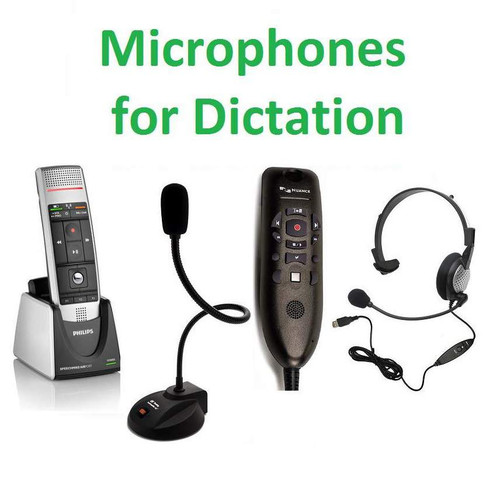
Microphone? This product does NOT include a microphone and a microphone is required for usage. Check out microphone options to add to your order.
Operating System? Microsoft Windows.
Return Policy? This product contains software. See our Return Policy.
Warranty: Manufacturer's warranty applies.
Questions? Have questions or want a custom quote (with multiple users, accessories, services, etc.)? Contact Us. Also visit our Technology Support page for more product info.
Product Features:
Nuance® Dragon® Professional Individual 16.0 enables allows business users and individuals to turn their ideas into text by dictating faster than even a proficient typist can type. Dragon® software allows "dictators" to navigate their PC, create documents, send email, control applications, and navigate the Web — just by talking. Users can also make use of a digital voice recorder or a dictation app on their smartphone to allow them to dictate while away and transcribe their audio files back at their PC or the PC of a support person. Users can also customize their vocabulary and add commands to type frequently needed text or perform a series of steps.
Dragon® Professional Individual, v16 key features and benefits:
- Enjoy fast and accurate recognition of your dictation
- Performs with fast response times and minimal latency
- Talk at normal speeds and see words appear on the screen almost instantly
- Delivers up to 99% speech recognition accuracy
- Get optimal accuracy for speaker with accents or in slightly noisy environments such as in a cubicle environment
- Get highly accurate results right out of the box with no training required
- Achieve increasingly accurate results the more you use it
- Further enhance accuracy with optional advanced training or analysis of existing documents and emails
- Dragon® v16's "Deep Learning" technology and adaptation methods delivers personalized accuracy of each unique voice and environmental variation
- Create documents such as reports, emails, forms and notes, and zip through computer tasks in record time
- Enter text anywhere you normally type.
- Dictate up to three times faster than typing
- Create, format and edit your documents, emails and other files by voice quickly and efficiently
- Enjoy Dragon's Enhanced Dictation (or Full Text Control), for fully voice-driven editing and command capabilities within many popular business applications that you use every day
- Command and control your computer by voice for convenience and comfort
- Launch applications, select menu items, press keys, switch between windows, search the Web, create and send emails and more all by voice, if you wish
- Work hands-free, if desired – Experience more ergonomic comfort when working on your computer – Feel less stress and strain on your body – Multitask by using your voice to dictate and execute commands
- Switch between keyboard, mouse and voice so you can use the mode of input you prefer for any given task
- Extend accessibility and prevent repetitive stress injuries
- Dragon® supports Section 508 standards to eliminate barriers for workers with disabilities that limit their ability to use a keyboard and mouse
View Section Microsoft's Accessibility Conformance Reports lookup page for 508 Compliance Assessment Voluntary Product Accessibility Template (VPAT) Report - look up "Dragon" - In addition, Dragon helps prevent fatigue and repetitive stress injuries by offering a comfortable, ergonomic alternative to the keyboard and mouse
- Use the many customization features of Dragon® to help the product perform even better
- Easily create custom words such as proper names and specific industry terminology such as acronyms, proper names and other unique or business-specific phrases
- In addition, you can import and export your custom word lists
- Create custom voice commands to insert frequently-used text and graphics or to automate multi-step workflows or business processes
- For example, create a command called "standard distribution" to send an email after adding a particular distribution list, copying your manager, and printing a hard copy
- Smart Format Rules automatically adapt to how you want abbreviations, dates, phone numbers, and more to appear, so you don’t have to correct them every time .
- Transcribe recordings from audio files recorded on approved digital voice recorders and smart phones -- without any special training required.
- No additional training required to transcribe third-party speakers, so you can complete transcription quickly and accurately
- You can also accurately transcribe another single speaker’s voice from pre-recorded audio files or from podcasts .
- Enjoy the audio features of Dragon®
- Simplify proofreading with natural sounding Dragon’s text-to-speech capability
- Listen to audio playback of your voice dictating your own dictation with the associated text highlighted on the screen .
- Choose your microphone for freedom and flexibility (no microphone is included)
- With automatic microphone detection, Dragon® will conveniently show you which microphones are available for you to use
- Because Dragon® lets you use multiple audio device types within your profile, you can easily switch to another microphone while keeping all your customization
This feature is useful if, for example, you use a USB mic at home, a wireless mic at work and your laptop’s built-in mic when you’re on the go . - Select from microphones of all types including head-worn, desktop, handheld, or built-in; with either wired or wireless connectivity; or with special features such as programmable buttons. Visit our microphone page to add a microphone to your order.
- Get started and gain proficiency quickly
- Enhanced help, contextual guidance, complete documentation, and helpful tutorials help you master your new product
- Dragon's intuitive design provides easy access to Dragon® features
How many licensed copies of Dragon® Professional 16 do we need for our “dictators”?
Dragon® Professional Individual 16.0 is licensed based on the number of dictating users.... So, count the number of dictating users to determine the count of Dragon® Professional Individual licensed users needed!
System Requirements for Dragon® Professional 16
NOTE: The install process checks that your PC meets for minimum requirements. If your PC does not meet these minimums, the software will not install
- Operating System:
Microsoft Windows 10 or 11 - Windows Server 2016, 2019, 2022
- RAM/Memory: Minimum recommended is 4 GB for Windows 10 or 11
More RAM is recommended. Examine your work to determine the memory requirements of all programs you want to run simultaneously. - Free Hard Disk Space: 8 GB+/-
Space needed can be reduced if don’t load all vocabularies.
Space needed can increase based on number of users and number of vocabularies per user. - An internet connection is required for software download, product activation -- a quick anonymous process, and access to online help
Other requirements/notes:
- Microphone: You will need a microphone -- an audio input source. Consider the needed connectivity for your microphone (USB, BlueTooth, etc.)
- Speakers are required for hearing tutorial, playback of recorded speech and text to speech features
- Attaching a recorder (purchased separately) may require a port (USB, serial, etc. depending on the model.) Contact us.
IMPORTANT NOTES:
- No Microphone is included
You will want a Nuance-approved microphone for use with your Dragon® product. Check here for microphone options. - This product does NOT support dictation into Electronic Medical Record (EMR) systems
For EMR support, please use Dragon Medical.
Resources
- Nuance Dragon® Professional V16 Data Sheet (PDF)
- Nuance Dragon® Professional V16 Cheat Sheet (PDF)
- Nuance Link to Dragon® White Paper - Driving Productivity and Cost Efficiency with Dragon® (PDF)
- Link to Dragon Professional 16 in-product help (Notice the menu in the upper left corner!)
- Release notes:
Dragon Professional 16.0 release notes
Dragon Professional 16.1 release notes <-- Dragon Professional 16.1 is the current major point release of Dragon 16. Make sure you have at least Dragon Version 16.1 - Also visit our Technology Support page for more product info.